Integrating FSM pages into the Mobile App (Technical Details)
This article describes the technical details of integrating FSM pages into the mobile app. You can find configuration instructions in the article Integration of FSM pages in the App (FSM Portal) .
Communication paths
The App Server provides the Mobile App with an HTTP-based interface. The app sometimes uses this to exchange data with the Control Center. Each access of the Mobile App is authenticated with the HTTP interface; either with the PwUser (login) data of the technician login in Innosoft or via a user who is managed in the external Customer Identity Management System and mapped to an internal Innosoft login (OAuth) . To do this, the Mobile App must reach the App Server from the internet (VPN solutions are rather rare and are ignored here in this section). In some cases, an additional reverse proxy filters HTTP requests and regulates which requests are forwarded to the App Server. The following figure illustrates how the Mobile App accesses the central data via the App Server. Access to the Document System has been omitted for reasons of clarity (more details can be found in App Server: Accessing the Innosoft document system ).
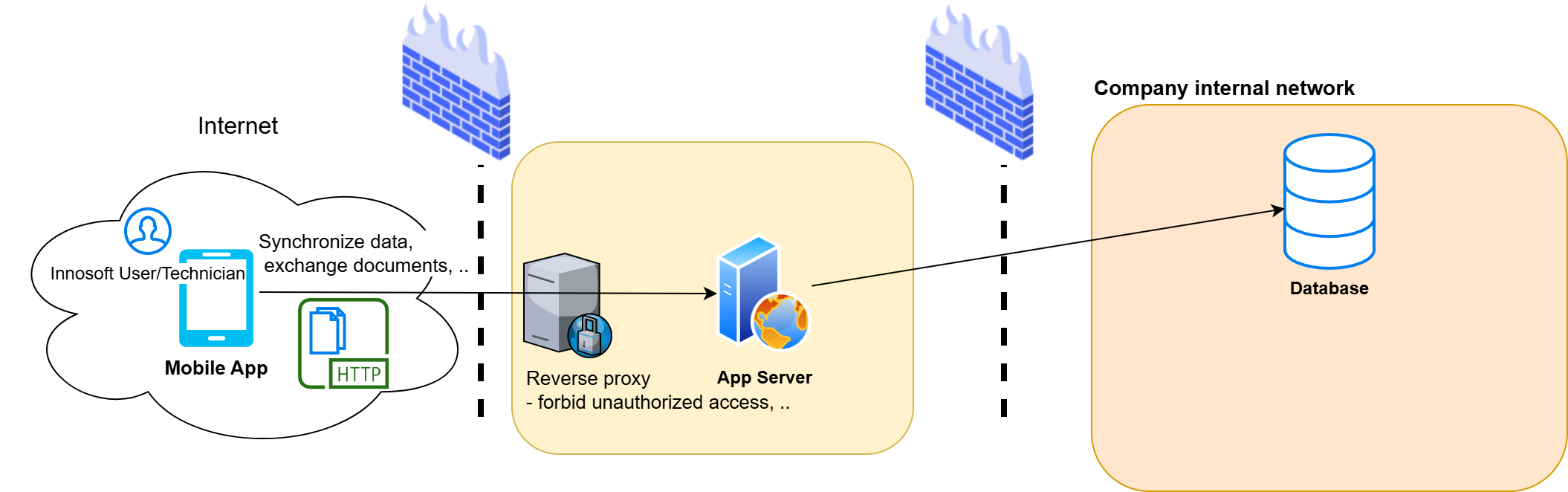
The Mobile App can display special FSM pages integrated in the app (e.g. travel reports). The browser loads web pages using the same protocol (HTTP) that is already used by the app server for interfaces. The communication path app ↔ App Server must already be guaranteed in terms of network technology so that the app can be used. In contrast, the customer's FSM is often not directly accessible from the internet. For this reason, all access from the Mobile App to the FSM pages takes place indirectly via the App Server, which interacts as a reverse proxy. This has the following advantages:
The FSM does not have to be directly accessible from the internet (only from the App Server).
Standardization of authentication: Similar to the interface calls, the Mobile App sends the authentication data with the FSM page requests. The App Server validates these and creates an FSM session for the logged-in user. For example, a user can be logged in via OAuth even if the FSM is not configured for OAuth.
The following figure illustrates the communication paths when the Mobile App loads a page from the FSM. The App Server acts as a reverse proxy here.
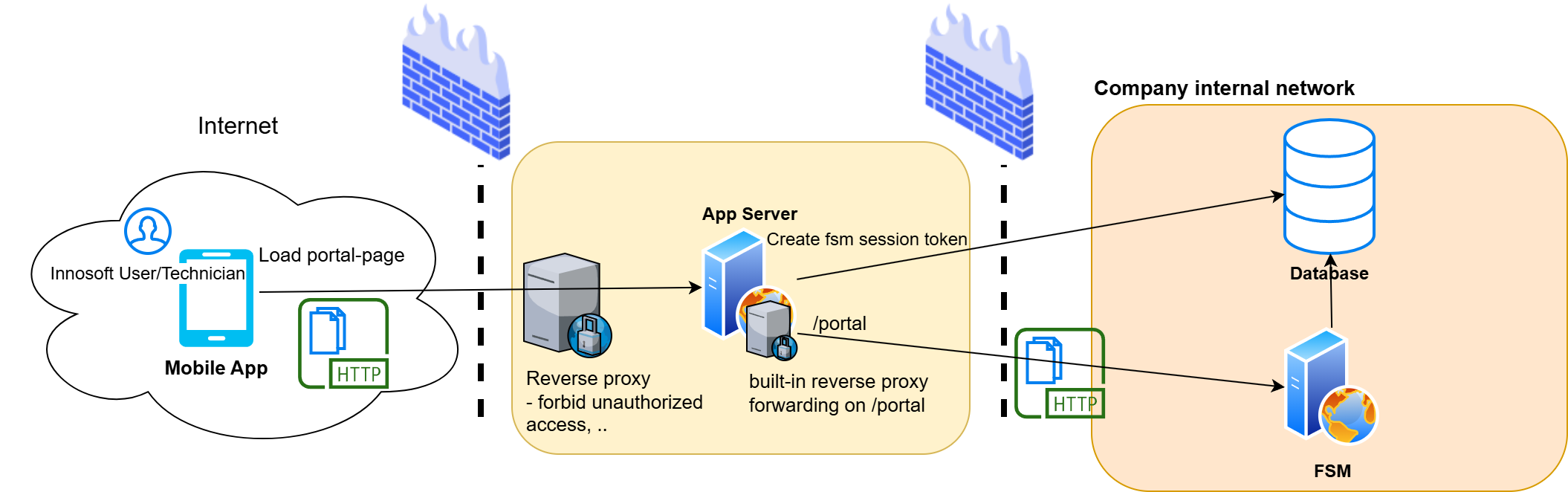
Assuming the Mobile App wants to load the page "Travel expenses reports" (relative path "TravelReport"), the App Server is running under the URL "https://example.com/mobile" and the FSM on the only internally available "https://mycompany.local/fsm", then the initial request goes through the following steps:
The Mobile App ensures that the user is logged in and sets the cookie "innosoftappauth" for the domain "example.com" with the path "/mobile/portal", which contains the access token from the App Server or from the external Identity Management System (OAuth) (other cookies are also set, e.g. for standardizing the language and formats).
The Mobile App performs a GET request for the page of the Travel expenses reports "https://example.com/mobile/portal/TravelReport". The previously set cookies are also sent.
The App Server at "https://example.com/mobile" accepts the request. As the request is made relatively below the "portal" path, it is a request to an FSM page. The App Server checks the access token in the "innosoftappauth" cookie and forwards the request to the FSM at "https://mycompany.local/fsm" via GET "https://mycompany.local/fsm/TravelReport".
If the user already has an existing session with the FSM (session cookie from the FSM is also sent), the HTML page is returned and displayed in the Mobile App. Otherwise, the following steps are taken to create a session with the FSM.
The FSM responds with a redirection to the built-in login page "Account/Login".
The Mobile App follows this redirection and loads the URL GET "https://example.com/mobile/portal/Account/Login".
The App Server receives this request and recognizes that it is a request to the login page of the FSM. The user has already logged in to the App Server. The App Server therefore generates a token for the corresponding Innosoft user (PwUser) in the "ExternalTokenLogin" table. The App Server sends this token to the FSM within the "X-Innosoft-Token" Http header with the GET "https://mycompany.local/fsm/Account/Login" request.
The FSM checks the token sent and responds with a redirect to the originally requested page "TravelReport". The FSM sets its internal session cookie in the redirect response.
The Mobile App loads the redirect "https://example.com/mobile/portal/TravelReport". The request contains the FSM session cookie so that the request is successfully forwarded to the FSM via the App Server and the FSM responds with the HTML page. The Mobile App displays the page.
Rewriting the FSM responses
In the FSM standard version, the pages in the Mobile App cannot be loaded successfully. This is illustrated by the following example: Let's assume that the App Server is running under "https://example.com/mobile" and the FSM under "https://mycompany.local/fsm". In this case, the host and path prefix are different. The Mobile App loads the HTML page of the Travel expenses reports via GET "https://example.com/mobile/portal/TravelReport". The App Server loads the corresponding HTML page acting as a reverse proxy via the GET request "https://mycompany.local/fsm/TravelReport". The HTML page references Javascript, stylesheet, images and other resources for complete display. The FSM links these sub-resources with absolute paths. Assuming the FSM contains the Javascript file "script.js" in its main folder, the HTML page contains a link with the following absolute path "/fsm/script.js". The web page was loaded via the URL "https://example.com/mobile/portal/TravelReport", therefore the link with the absolute path "/fsm/script.js" results in an incorrect GET request to "https://example.com/fsm/script.js" (the same problem occurs with redirects where the Location header in the response contains an absolute path). The problem is that the FSM generates the absolute paths as if the website were being loaded directly from the FSM url. In reality, the website is loaded via a reverse proxy with a different path prefix and host. In order for the FSM to correctly generate the paths for access via this reverse proxy, the reverse proxy must include the different properties such as host and path prefix in the requests to the FSM.
This problem has existed in the web world for some time, which is why the web community has developed a series of headers of the form "X-Forwarded-*". Due to their widespread use, these headers can be regarded as the de facto standard for such reverse proxy scenarios. The FSM does not support these headers in the current version. The App Server sets the X-Forwarded headers when it forwards requests to the FSM. In particular, the "X-Forwarded-Prefix" contains the absolute path under which the FSM portal is available. In this example, this is "/mobile/portal".
The missing FSM support can be replicated using the Microsoft IIS module "IIS URL Rewrite Module". This module allows the specification of rewrite rules that are applied to the HTTP response before it is sent. We define two rewrite rules that make the absolute paths in FSM responses compatible with the App Server Reverse Proxy. These rules are only applied when the request is made via the App Server Reverse Proxy, so that other requests remain untouched (so the FSM continues to work in the dispatcher's browser):
Rewriting the absolute path in the location header (redirection)
Rewriting absolute paths in relevant responses, such as HTML pages
Strictly speaking, other parts, such as the host, would also have to be rewritten for absolute URLs. The FSM links in the affected pages exclusively through absolute paths, so the rewrite rules only correct absolute paths for the sake of simplicity. You can copy the specific rewrite rules from the App Server Control Center setup page of the FSM portal.
|
Examples |
Value before the rewrite |
Value after the rewrite |
|
X-Forwarded-Prefix: /mobile/portal |
/fsm/script.js |
/mobile/portal/script.js |
|
X-Forwarded-Prefix: /mobile/portal |
/fsm/styles/default.css |
/mobile/portal/styles/default.css |
Operation of the App Server behind a reverse proxy
Please note the following details if you operate the App Server behind a reverse proxy.
Authentication of the Mobile App on the App Server
If you would like to restrict the queries in your own upstream reverse proxy, e.g. by checking the access token, you should note how the Mobile App sends the corresponding access token. Depending on whether it is a portal request or a normal Api request, you will find the access token in different request headers.
|
Request |
Access Token |
|
Standard Api request, e.g. data exchange (path "sync") |
Authorization header in the form "Bearer <AccessToken>" |
|
Portal request (requests below the path "portal") |
Cookie header sometimes contains the cookie "innosoftappauth" with the value "<AccessToken>" (without bearer "addition") |
Required headers
The reverse proxy should set the following headers when it forwards requests to the App Server:
|
Request-Header |
Explanation |
Impact |
|
X-Forwarded-Proto |
Only necessary if the protocols differ, e.g. with TLS termination in the reverse proxy. Values:
|
The App Server must know the protocol used by the app to access the proxy. This affects whether cookies are set with the secure property. If you have configured TLS termination in the proxy, the proxy forwards to the App Server using HTTP. In this case, you should forward the app's request scheme (https) in the X-Forwarded-Proto header to the App Server. If the header is not set, the secure property is set based on the protocol of the App Server request. |
|
X-Forwarded-Prefix |
Set to the base path if the proxy runs under a different path than the App Server. For example, if your proxy forwards to the App Server https://example.internal/innosoft under https://proxy.example.com/gateway/mobile, the X-Forwarded-Prefix is "/gateway/mobile". If the path prefix is the same, you do not need to set the header, e.g. for https://proxy.example.com/mobile to the App Server https://example.internal/mobile |
The path via which the app accesses the App Server and thus the FSM portal is relevant for the generation of URLs in FSM pages (see rewriting rules above). If the app accesses the App Server from outside via a different path, the App Server must take this into account accordingly for the URL rewriting rules for the FSM. The App Server itself adjusts cookie paths and forwards the different path prefix to the FSM portal, where the location header and the URLs in the response are corrected. If the header is not set, the App Server uses its own path prefix. The App Server therefore assumes that the app addresses the App Server externally via its own path prefix. |