App Transmission Status, automatic Data Transmission, App Change Messages
Introduction
This article describes the following three app functionalities:
App transmission status (FSM): How is the transmission status updated for the app in use?
Automatic data transmission: How does automatic app data transmission work and how is it triggered?
App change messages: How does the app generate change messages that inform the user about new, changed and deleted assignments?
Some of the functionalities can be used independently of each other. Due to the strong (technical) connection, the functionalities are explained together within this article. The general explanation focuses on the interaction of the functionalities. We therefore assume that all functionalities are active. However, there are also some notes on how the functionalities behave individually.
Motivation
Before the implementation of the new functionalities, the following problem existed in the interaction between the app and the head office: the technicians did not know when there were relevant changes in the head office (e.g. an assignment was postponed) and had to synchronize manually on a regular basis in order to obtain any relevant data. But even then, they had no overview of what had changed.
The aim here is therefore to automate this manual data transfer process if there are interesting changes in the head office for the individual technicians. Regardless of the automation, the technician needs a compact overview of the respective changes as the focus of the new functionality. This is particularly important when a large number of assignments are planned. In addition, feedback to the dispatcher was missing, which is partly known in the Classic Mobile Field Service through the dispatch status of the assignment. We would like to create a similar construct for the app, which informs the dispatcher about the processing status of the assignment.
In summary, the primary focus is on detecting changes in the head office and notifying technicians with a simple feedback mechanism for the dispatcher. Automation relieves the technician of data transmission. The concept is to be expanded in further releases so that the technician is completely relieved of data transmission (see "Open points until complete automation").
Overview
The scenario described is based on iOS/Android end devices. There are no push notifications for the Windows App (instead, the app can synchronize periodically). The use of change triggers can still be useful to reset the send status in the event of changes. The status process as a feedback mechanism for the dispatcher still works, with the exception that the intermediate status "Push notification sent" does not exist.
The solution consists of the following components:
Mobile App AppServer
Push Notification Sender Service
Accounting table Phx_PushNotifications
Trigger Tr_Phx_<SourceTable>_CreatePushNotification: Generates corresponding entries in the accounting table when relevant changes are made.
Firebase Cloud Messaging: Google Cloud Infrastructure for registering and delivering push notifications. With iOS, the message is delivered downstream via Apple's own APNS system.
FSM and in conjunction with the view V_Phx_Planung_CurrentPushNotificationJobStates: Displays the current send status of the app for each assignment.
Logging table Phx_Diagnostics: Events such as "when was a push message sent", "when was a sync started/ended (and for which push message)", "when was a message read-confirmed".
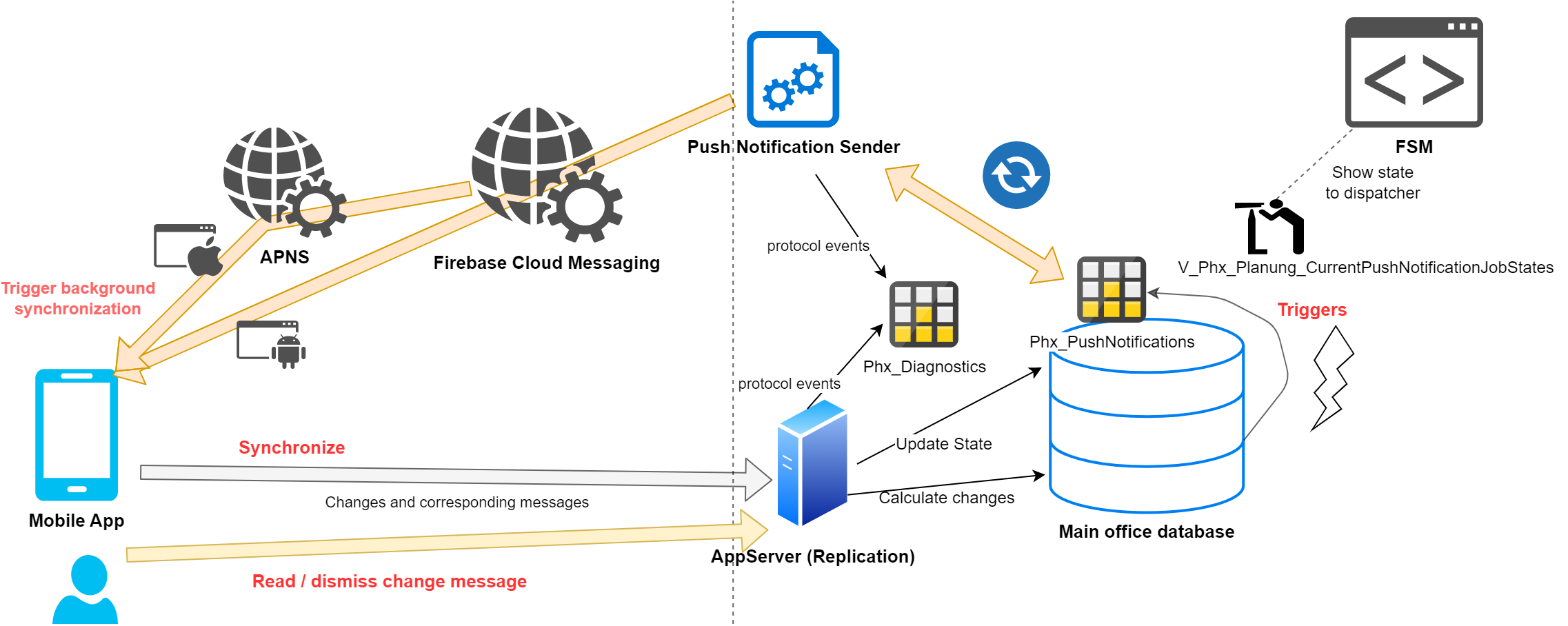
The following example outlines the rough procedure for a change at the head office:
An assignment at ACME for the technician John Doe is postponed by two weeks in the FSM. The trigger on planning Tr_Phx_Planung_CreatePushNotification recognizes this change and creates a data record in the Phx_PushNotifications table for the resource John Doe and the assignment at ACME. This new data record means that the processing status for the assignment in the FSM is in the initial status. The Push Notification Sender Service application recognizes the new, as yet unsent data record for the John Doe resource through periodic checks. The service then sends a push notification to John Doe`s device via Firebase Cloud Messaging, which contains a request for data transmission. The open entries for John Doe in the Phx_PushNotifications table are then marked as "Push notification sent". In this step, it makes no difference whether there are multiple entries for the resource John Doe (e.g. due to changes to different assignments). The device only needs to be prompted to transmit data once.
The push message is delivered to the device by Firebase Cloud Messaging. If the app is not active, the operating system starts the app for a short time in the background for processing. The app responds to the request within the push message and starts a data synchronization with the AppServer. This determines all changes at this point in time and the associated change messages (such as assignment XY at Z was moved to ...) and transfers them back to the app. In addition, the AppServer sets all open Phx_PushNotifications entries for the resource John Doe to "transferred", which in turn is reflected in the status display in the FSM. The change notifications optionally contain a reference to the corresponding Phx_PushNotifications entries. As soon as the technician wipes away the change notifications/marks them as read, the app transfers an update of the Phx_PushNotifications from "transferred" to "read" in the background.
Avoid defining triggers in the internal tables Phx_PushNotifications and Phx_Diagnostics. We reserve the right to change the table between versions. Triggers can also cause unexpected feedback effects. To query the current send status, use the view V_Phx_Planung_CurrentPushNotificationJobStates.
This is a simplified representation. In practice, the following cases are also dealt with:
Change data records in Phx_PushNotifications without relevant app changes are transferred to the specific status for the FSM (e.g. due to triggers and change message generation are different or various changes have been canceled in the meantime).
Handling of recoupling and multiple synchronization in the event of disconnection.
Minimization of traffic: A revision system (ascending identity key of the Phx_PushNotifications) discards unnecessary, delayed data requests if the corresponding data has already been transmitted.
The following deviations make sense for a special customer environment and are supported without any problems:
The change triggers are used, but no push notification transmitter is set up. In this case, the triggers reset the send status in the FSM, but the app is not notified. The technician receives the change notifications via a manual data transfer and the send status is updated (the "Push notification sent" status is skipped). This is also the case for the Windows App, as no push notifications are available here (instead, the app can synchronize periodically).
The change triggers are deactivated or record less than the change notifications and no push notification sender is set up. In this case, the triggers do not reset the send status in the FSM. The send status is only updated by a manual data transfer by the AppServer.
A description of how to set up the Push Notification Sender Service, the change triggers and change messages can be found in the article Push Notifications Sender Service: deployment / configuration.
Generation of messages
Change notifications are generated on the server side. Change messages are sent to the app with their complete content (title, short text, etc.) in the server response to a synchronization request and displayed there after synchronization. The server calculates the messages from changes that have occurred at the head office since the last synchronization time. The calculation of change messages is not implemented for all entities and fields, but for a scope that is considered useful, the parts of which can be (de)activated individually in the server's administration interface.
Conditions for generating messages
Currently, only messages relating to the creation, modification or deletion of assignments are generated. However, not all fields visible in the app are taken into account here, but only a scope of fields that is considered useful. Message generation can be configured in the Control Center.
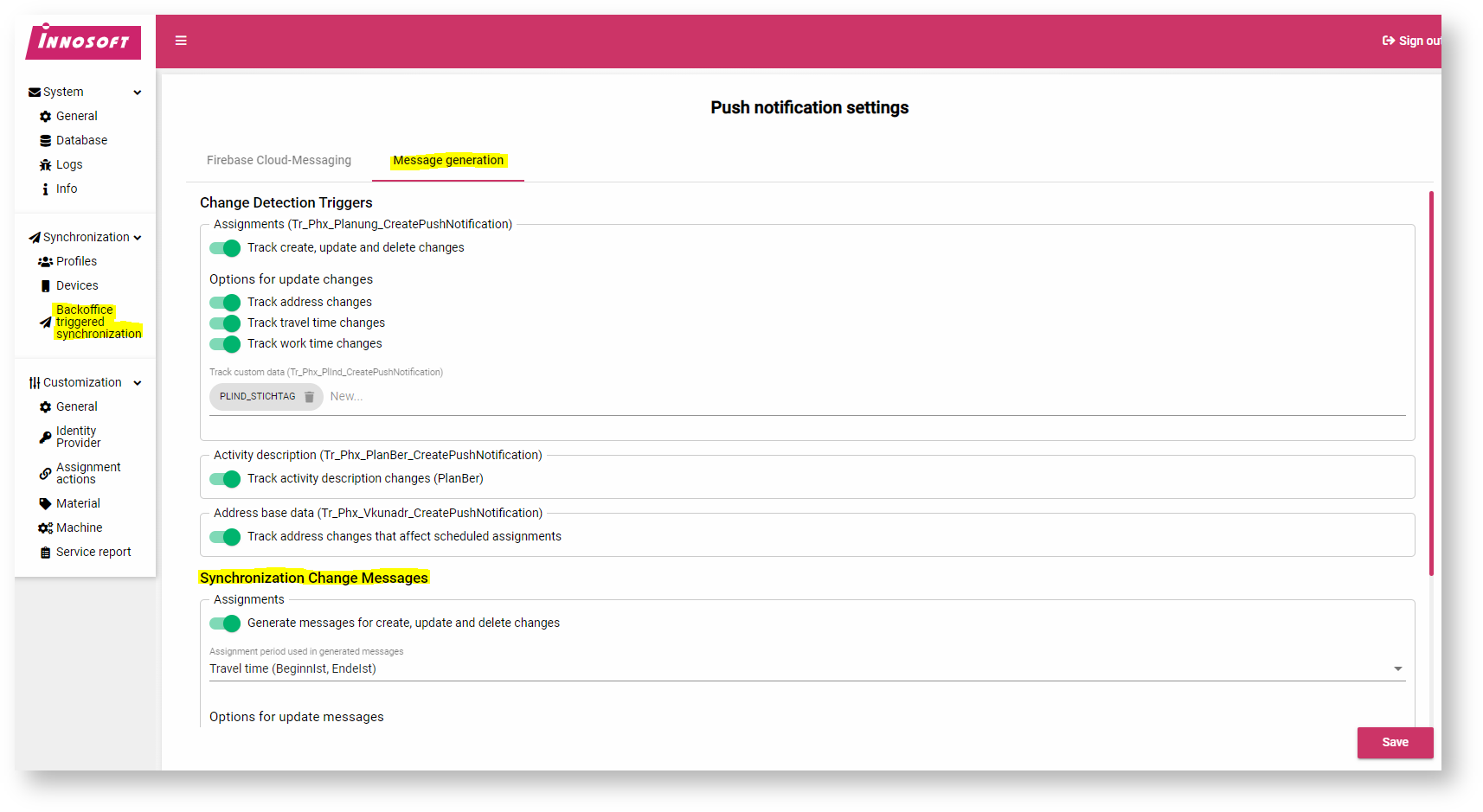
All assignments are taken into account for message generation that:
are in the synchronization period
are released for Field Service due to their transmission status
Special case initial synchronization / reset
In this case, the entire database is sent to the app. Due to the internal functioning of the App Server, it is not so easy to determine any change messages that are relevant for the technician. The App Server could only recognize each assignment in the database as a create and send out a change message. However, the technician should not be disturbed by many unnecessary messages. On the other hand, however, no messages should be misappropriated.
As a compromise, in this case the App Server only sends create messages for assignments whose end is in the future. The send status for these assignments is also reset to sent (from read, if applicable).
Components of a message
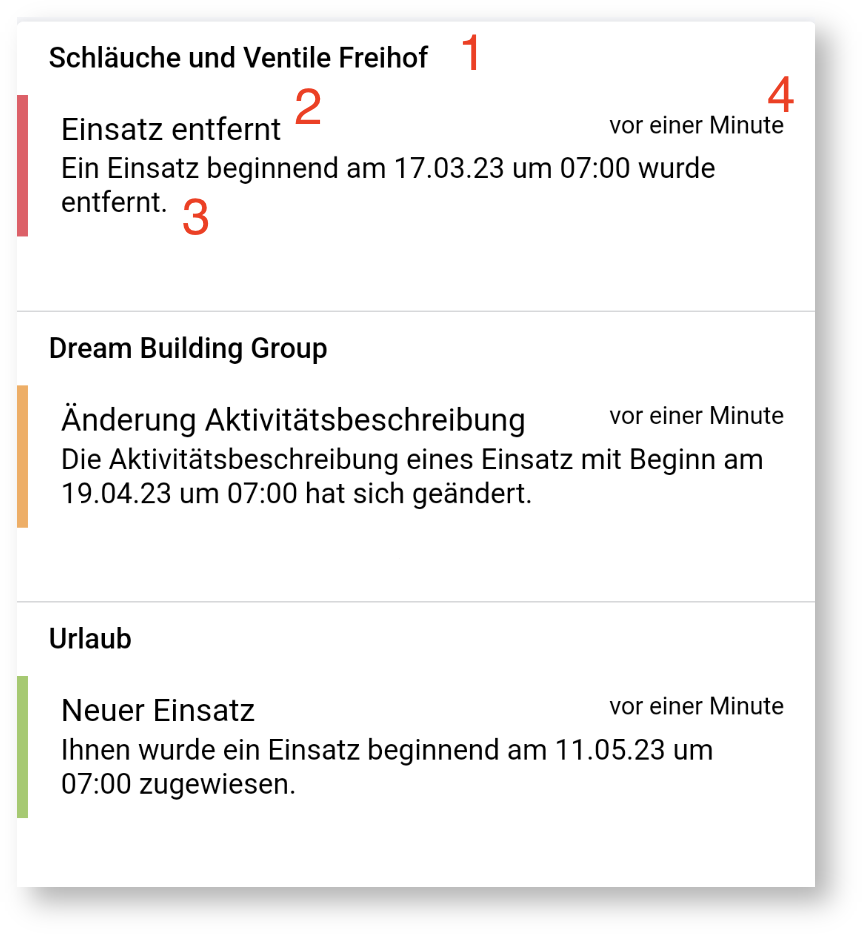
Title: Used to quickly identify the assignment. The assignment address is displayed for address-related assignments. For non-address-related assignments, the name of the identifier is used.
Short text: Indicates the type of change.
Display text: More detailed information on the change.
Time period: Up to the time at which the message arrived on the app (not the time at which the dispatcher made the change).
Localization
The AppServer calculates the change messages during synchronization. The messages are sent to the app already completely localized (language, formats). To do this, the server uses the language saved in the profile. However, the change of language can only be applied to change messages generated in the future and therefore has no effect on messages generated in previous synchronizations.
Standard message texts are available for the languages supplied with the AppServer. These can be adapted in the localization settings of the FSM. Translations for self-defined languages can also be added.
Languages can be released for Innosoft Mobile in the Control Center and formatting options (date, numbers, etc.) can be selected for language/culture. The selected formatting options are also applied during message generation. Further information can be found in the article “Localization ”.
The translation keys for message texts can be displayed and edited in the FSM translation editor by setting the "Applications" filter to "Innosoft Mobile Management". All translation keys follow a certain pattern.
Standard translation key
Examples:
ASSIGNMENT_CREATE_DISPLAYTEXT_WORKTIME
ASSIGNMENT_UPDATE_ACTIVITYDESCRIPTION_SHORTTEXT
ASSIGNMENT_UPDATE_ACTIVITYDESCRIPTION_DISPLAYTEXT_TRAVELTIME
ASSIGNMENT_UPDATE_ACTIVITYDESCRIPTION_DISPLAYTEXT_WORKTIME
All keys currently have the “ASSIGNMENT_” prefix.
SHORTTEXT or DISPLAYTEXT:
SHORTTEXT means the short text (2)
DISPLAYTEXT means the display text (3)
(see above: “Components of a message”)
TRAVELTIME or WORKTIME
Which translation key is used depends on the "Assignment period" setting on the "Message generation" page in the Control Center.
Additional data
Standard translations are also defined for change messages for additional data.
Examples:
ASSIGNMENT_UPDATE_CUSTOMDATA
_SHORTTEXT
ASSIGNMENT_UPDATE_CUSTOMDATA_DISPLAYTEXT_TRAVELTIME
ASSIGNMENT_UPDATE_CUSTOMDATA_DISPLAYTEXT_WORKTIME
These keys apply to all additional data fields configured for message generation. However, special translations can also be configured for specific additional data fields.
Assuming there is the database field “FieldName”, which is configured as part of the additional data for message generation, the following special keys could be defined in the localization interface of the FSM:
ASSIGNMENT_UPDATE_CUSTOMDATA_SHORTTEXT_FIELDNAME
ASSIGNMENT_UPDATE_CUSTOMDATA_DISPLAYTEXT_TRAVELTIME_FIELDNAME
ASSIGNMENT_UPDATE_CUSTOMDATA_DISPLAYTEXT_WORKTIME_FIELDNAME
Open points until complete automation
Assuming that the technician does not have to perform manual synchronization if the app is prompted to synchronize data at regular intervals, this is unfortunately not 100% correct in the current implementation. Although the local changes to the device are also imported into the head office through a background data transfer, there are two exceptions: Documents cannot currently be uploaded automatically and therefore print jobs cannot be transferred automatically (we do not know which document is to be printed). The document upload currently only works via the upload dialog that appears during manual synchronization. Within the new notification page, a warning appears informing the user of a manual transfer if there are local documents or print jobs. The app also does not initiate data transfer on its own if local data is available and the last transfer was some time ago.
FAQ
Why are the tables, triggers and views not in the table description?
In general, all schema objects with the prefix Phx (the app's code name for Phoenix) are to be regarded as internal implementation details of the AppServer. The AppServer versions and migrates these schema objects between version updates. In addition, the schema objects contain constructs that the Innosoft IsDbUpdate does not support (e.g. identity column or unique constraints). In order to protect dependent applications, such as the FSM, from schema changes, we define indirections in the form of views that are tailored to the individual use case. For example, the FSM does not access the Phx_PushNotifications table directly to determine the send status of a job, but instead uses the V_Phx_Planung_CurrentPushNotificationJobStates view as an abstraction.
Why is the current implementation limited to assignments and not, for example, to service reports or projects?
We see the assignment as the primary communication object between the dispatcher and technician. The triggers, which are created by the AppServer on the relevant tables depending on the configuration, can recognize relevant changes independently of the application and thus indirectly trigger the app. This variant currently only works because the app itself cannot modify this data. In the case of service reports, the context in which the change was made is important, e.g. to prevent a feedback effect when the technician edits his own service report. This is difficult at trigger level. In addition, associated processes, such as a correction process for a service report by the dispatcher, are not yet defined in the standard, which means that a lot of preparatory work still needs to be done.
My desired change is not supported: How can I transfer a change of use with my own change message to the app?
For customer customizing, we do not recommend writing directly to the Phx_PushNotifications table. Instead, you can add a separate PLIND field for this, which you can either change (e.g. increment the number) or write a change text in if a change is necessary (alternatively, you can also change the work instruction of the assignment, i.e. PLANBER). You then add the corresponding PLIND field in the AppServer configuration interface in the Change Detection Trigger section. If you want to display the field as a change text, also activate the field in the Change Message section. This means that the customization runs via the officially supported path, so that no problems are to be expected with version updates.
Interna
Legend: NOT NULL, PK
|
Column |
Data type |
Explanation |
|
Id |
BigInt, Auto Increment |
Strictly ascending Id of the data records. The internal program logic takes this Id as a revision and requires the value to be strictly increasing. Hence an identity column. |
|
SubmittedAtUtc |
DateTime |
Utc Timestamp of the time at which the data record was created. |
|
SubmittedByUser |
NVarchar(12) |
PWUser.name of the login that was responsible for creating the entry. The triggers insert the change/create login of the original table. If there is no change login for the changed data record, the triggers insert "<unknown>". |
|
SubmittedByPrg |
NVarchar(255) |
Name of the program that inserted the entry. Usually contains the name of the responsible trigger. |
|
RessNr |
NVarchar(10) |
RessNr of the technician for whom the change is to be sent. |
|
PushNotificationState |
Int |
Processing status of the push notification: 0 = New, 1 = Sent to Firebase |
|
CompletionState |
Int |
Processing status of the data transmission: 0 = New, 1 = In process, 2 = Transmitted, 3 = Read-confirmed |
|
Context |
NVarchar(50) |
Currently zero or 'assignment' |
|
ContextKey |
NVarchar(50) |
If Context is set, the ISGUID of the target data record (e.g. PLANUNG.ISGUID for 'assignment'). |
|
DeviceNotificationSentAtUtc |
DateTime |
Utc Timestamp of the time at which a push notification was sent to Firebase from this data record (PushNotificationState = 1). |
|
TransferredAtUtc |
DateTime |
Utc Timestamp of the time at which the processing status was set to Transmitted (CompletionState >= 2). |
|
TransferredByRequestingAppRevision |
BigInt |
Internal field of the AppServer. This prevents further side effects if a data transfer process is not completed successfully and has to be repeated. |